

The most familiar print method isn’t always the best fit. Digital printing can work well for short runs and customised jobs, but your choice should also account for the product, artwork, colour expectations and deadline.
It’s reasonable to want the finished print to match your approved design, especially when fine details or event dates matter. Digital printing transfers artwork from a digital file to the print surface, while methods such as offset printing use a different production process. Each suits different jobs, so quantity alone shouldn’t determine your choice.
This guide explains digital printing in plain language and shows where it can be a practical choice, from business cards and food packaging to event displays. You’ll learn what to consider when choosing a print method, preparing artwork and reviewing a proof, so you can catch avoidable issues before production begins. We’ll also cover how product selection and delivery options fit into planning an order in the UAE.
Key Takeaways
- Learn how digital printing turns digital artwork into a finished print job, and what can influence the result.
- Understand why printed colours may differ from screen colours, and what to check when reviewing a proof.
- Compare digital and offset printing by setup, quantity, artwork changes and the needs of your specific job.
- Before placing an order, confirm the product, dimensions, quantity, artwork, material, finishing and delivery details.
- See how Yalla Printing’s design support and pre-production proof approval can help you order business and event print with greater confidence.
What Is Digital Printing, and What Happens to Your Artwork?
Digital printing is a commercial process that turns a prepared digital file into a finished print job, with the setup, material and finishing selected for the product. It’s more than sending a file to a home office printer: a commercial order includes artwork review, a product-specific production setup, proof approval and final checks. The Digital printing overview explains the wider range of processes and applications.
Your file guides the design, but it doesn’t determine every detail of the finished item. A business card, food package and event display each have different requirements. The selected material and any requested finishing also affect how the artwork is prepared and how the final product looks and feels.
How does digital printing turn a file into a finished product?
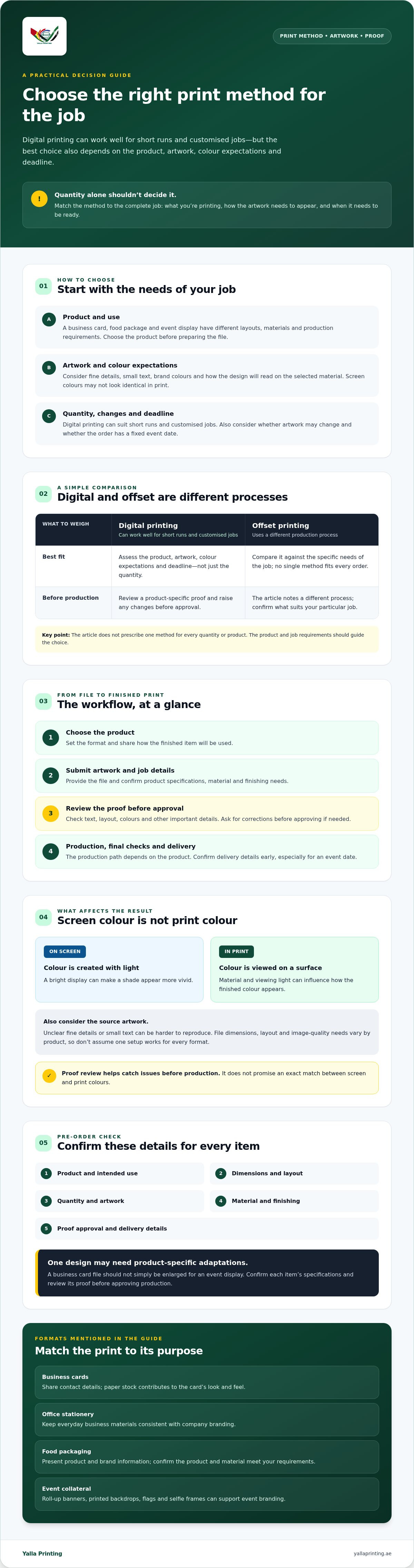
The workflow starts with your product choice and submitted artwork. The printer reviews the file and job details, then prepares the order for production. You review a proof before production begins. Check the text, layout, colours and other key details carefully, and request corrections before approval if anything needs to change.
After approval, the job moves into production using steps suited to the chosen product. Final checks help confirm the completed order before fulfilment and delivery. Not every product follows the same production path: business cards and event materials, for example, may need different setups, materials and finishing. Share your requirements early, especially if the order has a fixed event date.
Which print jobs commonly use digital printing?
Businesses and event teams use digital print for a range of practical needs. Match the format to how people will use it:
- Business cards: Share contact details at meetings, events or client visits. The chosen paper stock is part of the card’s look and feel.
- Office stationery: Keep everyday business materials consistent with the company’s branding.
- Food packaging: Present product and brand information on packaging for customer orders or retail use. Confirm the product and material meet your requirements.
- Event collateral: Use items such as roll-up banners, printed backdrops, flags or selfie frames to support event branding and draw visitor attention.
One brand design can provide a starting point across these formats, but it usually needs to be adapted to each product’s layout and dimensions. Don’t assume a business card file can simply be enlarged for an event display. Confirm the specifications for each item, then review its proof before approving production.
What Affects Digital Print Quality, Colour, and Consistency?
A clear design is a good start, but the finished result also depends on the source artwork, the colours used, the selected material and the product’s requirements. Small text or fine details may be harder to reproduce if they are unclear in the original file. A colour that looks bold on one surface may appear different on another.
Screens emit light, while printed colours are viewed on a physical surface. That’s why artwork shown on a bright display may not look identical when printed. Material, surrounding light and viewing conditions can also affect how a colour appears. Digital printing can produce high-quality results, but a proof or design review doesn’t promise an exact screen-to-print colour match. A historical Rochester Institute of Technology test found digital print quality could serve as a substitute for traditional printing processes, but that finding doesn’t guarantee an identical result for every design, material or job.
Before sending artwork, confirm the file requirements for the specific product. Dimensions, layout and image quality needs can differ between a business card and another printed item. If you’re unsure, ask for guidance before submitting the file rather than assuming one setup suits every product.
Why can printed colours look different from screen colours?
A screen creates colour with light; a printed surface reflects light. These are different ways of viewing colour, so a shade may appear brighter on screen or shift in print. The artwork itself, the chosen material and the lighting where the finished item is viewed can all influence the result.
Review the proof in good light and pay attention to important brand colours, contrast and legibility. If something looks unclear or concerning, raise it before approval. Checking a proof before production gives you a chance to catch layout or artwork issues while changes can still be discussed.
What should you check in a digital print proof?
Review the proof against your approved artwork and the product you ordered. Check:
- Spelling, names, contact details and other essential text
- Image placement, cropping, margins and the overall layout
- Whether the proof shows the correct product version and artwork
- Any details about the material or finishing that remain unclear
Approval is the handoff point to production. Resolve questions before you confirm, and make sure the proof reflects the version you intend to print. If you’re preparing business cards, you can review the business card printing options as you consider product requirements.
Digital Printing vs Offset Printing: Which Fits Your Job?
Choose a print method by matching the job to its production needs, not by assuming one method always delivers the best result. Digital printing and offset printing differ in setup and how they handle changes between copies. The right choice depends on your quantity, artwork, material, finishing and required delivery date. Confirm the available method and specifications with your supplier before placing the order.
| Factor | Digital printing | Offset printing |
|---|---|---|
| Setup | Often needs less job-specific setup, which can suit simpler or shorter runs. | Typically involves more preparation before production, including creating printing plates. |
| Quantity | Can be practical for shorter runs, depending on the product and specifications. | May suit larger runs where the setup is spread across more copies. |
| Variable artwork | Often accommodates changes between copies, such as different names or versions. | Changes between copies can require additional setup, so ask how they affect the job. |
| Job suitability | Consider it for jobs that need flexible versions or a modest quantity. | Ask about it for larger or highly specified jobs where production requirements may favour this method. |
When is digital printing a practical choice?
It can be a good fit when you need a shorter run or multiple artwork versions. For example, a business might prepare cards with different staff contact details, or create event materials with separate dates or messages. Promotional materials may also need tailored versions for different audiences. These are common use cases, not a guarantee that every product or design can be produced this way. Confirm the specifications and production options first.
When should you ask about offset printing?
For a larger run or a job with detailed requirements, ask whether offset should be considered alongside digital. There’s no universal quantity threshold that applies to every product. Share the quantity, dimensions, chosen material, finishing needs and deadline so the supplier can assess the job instead of recommending a method based on volume alone.
Practical takeaway: For a business or event order, describe what you need and how the finished items will be used. Then compare the methods your supplier confirms are suitable, including their setup, versioning and production requirements. This gives you a more reliable basis for choosing than a blanket rule about which method is faster or better.
How to Prepare a Digital Print Order Without Avoidable Errors
A clear brief helps the supplier match your artwork to the right product and production requirements. Before starting a digital printing order, gather the details below and check the supplier’s current file requirements for that specific item. File settings aren’t universal, so don’t assume a file prepared for one product is ready for another.
What information should you prepare before requesting a print order?
Work through these steps before submitting your order:
- Define the use. Decide where and how people will use the printed item. Note any event date or other firm delivery deadline early.
- Choose the product. Identify the format you need, such as business cards, office stationery or event materials.
- Confirm the specifications. Share the final dimensions, quantity, chosen material and any finishing needs. Ask the supplier to confirm what’s available for your product.
- Gather your artwork. Prepare the approved logo, images, text and other brand assets. Check that you’re using the intended version.
- Check file requirements. Confirm accepted file formats and any product-specific artwork instructions. If the design needs preparation or adjustment, ask whether design support is available.
- Review delivery details. Confirm the delivery option and address, and check that the available timing works with your deadline.
Providing complete information at the start makes it easier to spot missing details before production planning begins. If timing is critical, share the date before confirming the order so the supplier can advise on suitable options.
How should you review and approve the proof?
Review the full layout at a readable scale. Check spelling, contact details, alignment, image placement and important design elements. Make sure the proof shows the correct product version and the artwork you intend to print. If something looks wrong or unclear, ask for a correction or explanation before approving it.
Proof approval is the handoff to production, so confirm the details are right before giving the go-ahead. Keep a simple checklist nearby:
- Product, dimensions and quantity confirmed
- Material and finishing needs checked
- Artwork and file requirements reviewed
- Proof details checked and approved
- Delivery option, address and deadline confirmed
Yalla Printing offers design support and proof approval before production for its online custom-printing orders across the UAE. Prepare your print order with Yalla Printing by gathering your product details and artwork before you begin.
From Approved Proof to Delivery: Ordering Digital Printing with Yalla Printing
For businesses, events and brands across the UAE, Yalla Printing offers online custom printing for a range of business and event needs. Products include business cards, office stationery, food packaging, event displays and promotional gifts. The process moves from sharing your requirements to approving a proof and arranging delivery, giving you a chance to check the artwork before production.
What can businesses and event teams order?
Start with the purpose of the print. Intended use helps determine the product, artwork layout and details to confirm before ordering. Yalla Printing’s offerings include:
- Marketing materials: Business cards and office stationery for everyday business communication and customer meetings.
- Event displays: Roll-up banners, printed backdrops, flags, cutouts and standees, selfie frames, and acrylic table displays for event branding and visitor engagement.
- Packaging: Food packaging for businesses presenting products to customers.
- Branded merchandise: Promotional gifts for business campaigns, events or client appreciation.
Each format has its own layout and requirements. A business card design, for example, won’t automatically suit a roll-up banner or food packaging. Identify the product and how it will be used, then confirm the relevant artwork, dimensions, material and finishing details for that order.
How does the order move from design support to fulfilment?
Share your product choice and requirements, along with your artwork or design needs. If the file needs preparation or adjustment, Yalla Printing offers design support. Review the proof carefully and approve it only when the details reflect the version you want produced. Production begins after proof approval, giving you an opportunity to check the artwork before that handoff.
Once the proof is approved, confirm the delivery option and timing for your specific order. Fast, standard and express delivery options are available, with delivery throughout the UAE. The suitable option and expected timing can depend on the order, so share any event date or firm deadline early and confirm the details before proceeding.
To make the process smoother, have your product, quantity, dimensions, artwork status, material and finishing requirements ready when you place an order. This information helps clarify what you need and supports a more straightforward digital printing workflow from design review to fulfilment. Explore Yalla Printing’s online print services and review the options for your business or event.
Choose Your Print Method with Confidence
The right print method depends on the job. Match the product, quantity, artwork and deadline to what the supplier can produce, rather than assuming digital printing is always the best fit. Prepare the correct file requirements for your chosen product, and check the proof carefully before approving production.
For businesses and event teams ordering through Yalla Printing, free design support can help when artwork needs preparation. You can review and approve a proof before production, then confirm the delivery option and timing for your order. Fast, standard and express delivery options are available across the UAE, but check which option fits your specific deadline.
Before placing an order, gather your product details, dimensions, quantity and artwork. Explore Yalla Printing’s custom print services to review options for your business or event.
Frequently Asked Questions
What is digital printing?
Digital printing produces printed items from digital artwork prepared for a specific product. The supplier reviews the file and moves it through a production workflow suited to the order. The result depends on the artwork, product specifications, material and finishing. Before submitting a file, ask the printer for current requirements for that product. Then review the proof carefully to check the proposed layout and raise any concerns before approving production.
Is digital printing suitable for small print runs?
Digital printing can be practical for smaller runs, but the best fit depends on the product, quantity, specifications and production setup. Don’t assume one method suits every job. A business ordering a limited batch of cards, for example, may have different needs from a team preparing event materials in several versions. Share the quantity and intended use with the supplier, then ask which process fits and whether the artwork needs adjustment.
Can digital printing reproduce the exact colours on my screen?
Not necessarily. Screens create colour with light, while printed colours appear on a physical material. The artwork, chosen substrate and viewing conditions can all affect how a colour looks. Review the supplied proof for layout and colour concerns, and ask the printer how colour expectations are handled before approval. A screen preview isn’t a guarantee of an exact match, so raise any important brand-colour questions before the order moves into production.
How do I prepare artwork for digital printing?
Start by checking the printer’s current file requirements for the specific product. Confirm dimensions and layout, then review spelling, image quality, margins and any required bleed or file format. Requirements can vary between products, so don’t reuse settings from another order without checking. If the artwork isn’t ready, ask whether design support is available. This can help clarify what preparation or adjustments are needed before you submit the final file.
What is the difference between digital and offset printing?
Digital printing uses a digital production workflow, while offset printing uses a different process. Neither method is automatically right for every job. The choice depends on quantity, artwork, product specifications and other production requirements. Ask whether variable artwork or a large run changes which options are suitable. Share your job details with the supplier and request a comparison based on your requirements, rather than relying on a fixed quantity rule.
Do I need to approve a proof before digital printing?
A proof lets you review the proposed layout before production. Check names, contact details, spelling, image placement, dimensions and the overall design. If you spot an error or something is unclear, request a correction or explanation before approving it. Yalla Printing offers proof approval before production, giving customers a chance to confirm the submitted design before the order moves forward. Review carefully, since approval is the handoff point to production.
How long does a digital print order take?
Timing depends on the product, order specifications, production schedule and delivery option. Yalla Printing offers fast, standard and express delivery options across the UAE, but available timing should be confirmed for your specific order. If you’re working towards an event or campaign date, share the deadline early. Ask the team to confirm production and delivery expectations before placing the order, rather than assuming an option will meet your required arrival date.
Can I get help with my print design before ordering?
Yes. Yalla Printing offers free design support for customers ordering custom print products. Prepare your text, logo, images, intended product and any brand guidelines so the team can understand what you need. Confirm what adjustments may be required, and check the product-specific file requirements before submitting artwork. Review the proof carefully before approval. Design support can help with the artwork workflow, while proof review lets you check the proposed design before production.