

The right business card size can still produce the wrong result if your artwork file is set up only to the finished dimensions. The card you hold and the larger file prepared for trimming are not always the same size.
If you’re choosing a conventional format, consider your audience. In the UAE, 90 × 55 mm is commonly accepted, while 90 × 50 mm is also used. Other markets often follow different dimensions, so a card for international clients may need another format. Whichever size you choose, keep important details away from the edges so they aren’t trimmed off.
This guide compares common business card dimensions and explains finished size, bleed and safe area. You’ll learn how bleed extends the design beyond the cut line, how a safe area protects text and logos, and what to check in your artwork before approval. Yalla Printing offers free design support and a proof to review before production, so you can check the layout before your cards are printed.
Key Takeaways
- Choose a finished card format that suits your audience, layout and how you’ll hand out the cards.
- Understand how the business card size you select differs from the larger artwork file prepared for printing.
- Use the printer’s current specifications to confirm bleed, safe area and export requirements before preparing your file.
- Check dimensions, orientation and contact details on the proof before approving production.
- Use design support if you need help preparing your layout for business card printing.
Business card size explained: finished dimensions versus artwork size
The finished business card size is the measurement of the card after it has been cut. The artwork size is the full area of the file supplied for printing, which may extend beyond the card’s final edges. Keeping these measurements distinct helps you prepare a file that prints cleanly.
What does business card size mean?
Finished dimensions describe the physical card after trimming, usually written as width × height. For example, a landscape card measuring 90 × 55 mm is 90 mm wide and 55 mm high once cut. That’s the size you hold or place in a cardholder, not necessarily the size of the submitted artwork.
Formats differ between markets and suppliers. A 90 × 55 mm card is commonly used in the UAE, while European and US conventions use other dimensions. For a broader regional comparison, see these common business card dimensions. Before setting up your file, confirm the finished size and template accepted by your printer.
Why is the artwork file larger than the finished card?
Bleed is extra background artwork that continues past the trim line. Printers cut stacks of cards, and the cut can vary slightly during production. If a background ends exactly at the intended edge, a small shift may leave a thin white strip. Extending the background gives the trim some room while keeping the finished card covered.
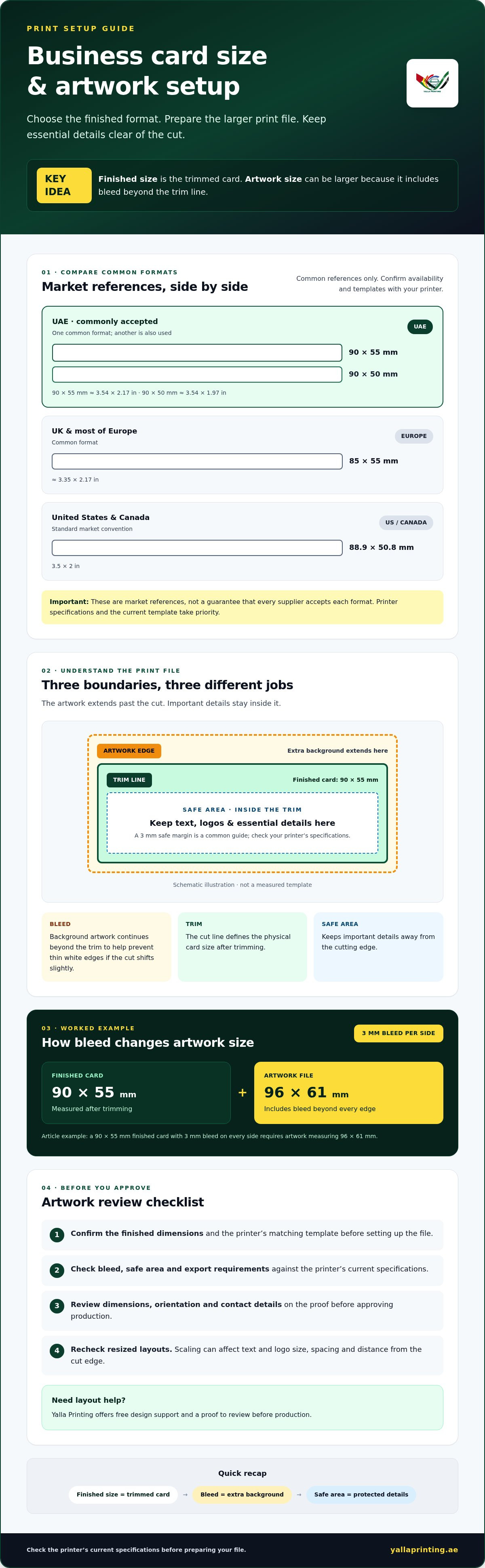
As a common example, a 90 × 55 mm card with 3 mm of bleed on every side would need artwork measuring 96 × 61 mm. Keep text, logos and other essential details inside the trim line, away from the cutting edge. A 3 mm safe margin is also a common guide, but use the printer’s current specifications rather than assuming every supplier uses the same setup.
In brief: finished size is the trimmed card, bleed extends the background beyond the trim, and the safe area keeps important content away from the edges.
Simple diagram brief: Picture three nested rectangles. The outer rectangle is the artwork edge, the middle rectangle is the trim line, and the inner rectangle marks the safe area for text and logos. The card remaining after the cut is the finished size.
Check the required finished dimensions, bleed and safe area against the printer’s template before exporting. If you’re ordering business cards through Yalla Printing, its free design support and proof approval before production can help you review the layout and catch setup issues before printing begins.
Standard business card size in the UAE and common international formats
There isn’t one business card size used everywhere. The dimensions below are common market references, not confirmation that every printer accepts each format. The supplier’s current template and production specifications take priority, so check which finished sizes are available before preparing your artwork.
UAE: 90 × 55 mm (approximately 3.54 × 2.17 inches) is a commonly accepted format. 90 × 50 mm (approximately 3.54 × 1.97 inches) is also used.
UK and most of Europe: 85 × 55 mm (approximately 3.35 × 2.17 inches) is a common format.
United States and Canada: 88.9 × 50.8 mm (3.5 × 2 inches) is the standard market convention.
Which business card dimensions are common in the UAE?
Both 90 × 55 mm and 90 × 50 mm appear in UAE market references. Don’t treat either as an official national standard or assume a particular supplier offers both. Customer expectations and printer options can vary. Confirm the finished dimensions and matching artwork template with your printer before designing or ordering.
How do European and US business card sizes differ?
European cards commonly measure 85 × 55 mm, while the US and Canadian convention is 88.9 × 50.8 mm. The difference affects the card’s proportions and the space available for your details. A design prepared for one market may need to be adjusted for another.
Avoid resizing an existing print file without checking the layout. Scaling can make text and logos appear too small, alter the spacing or move content closer to the cut edge. Review bleed, trim and safe margins as part of the file check, then use the chosen printer’s template to confirm the setup.
For business card printing in the UAE, confirm Yalla Printing’s currently accepted finished sizes and matching artwork templates before submitting a file. The market references above are useful for comparison, but they don’t replace those specifications. You can check Yalla Printing’s business card options as you decide which format suits your audience.
Choose a business card size that fits your layout and use
The right format depends on who will receive the card, what information it needs to carry and how you plan to hand it out. A compact card can be easy to carry and familiar to handle. A larger format may give a detailed layout more room, but can be less convenient in a wallet or cardholder. Neither option is automatically better.
When should you choose a compact or larger card?
Choose a compact format when portability and familiar handling matter most. If the card needs multiple contact details, a website, social profiles or information in more than one language, check that everything fits without crowding. A larger card may provide more room, but confirm that your printer accepts the dimensions before designing. In either format, check legibility at actual size instead of shrinking the text until it fits.
Prioritise the information people need to act on. A name, role and one clear contact method may suit a simple layout. A multilingual or information-rich card needs careful spacing and hierarchy. Remove details that aren’t essential before reducing type size. Reviewing a proof at its intended physical scale can help you spot text that looks readable on screen but is too small on paper.
Does portrait or landscape orientation change the card size?
No. Orientation describes how the design is arranged, not the card’s finished dimensions. A landscape layout is wider than it is tall; a portrait layout is taller than it is wide. Rotating the same dimensions changes the direction of the design, not the card’s physical size.
Landscape often gives a logo, name and contact details room to sit in a horizontal sequence. Portrait can place a logo above the name and details for a vertical reading flow. Try both if the layout feels cramped, then check the result at actual size. Keep type comfortable to read and leave clear space around important elements.
Consider the full handout experience
Think about where and how you’ll share the cards. Cards exchanged at meetings may benefit from familiar proportions that fit standard holders. Cards included with a package or handed out at an event may allow more flexibility, provided the format is still easy to keep. If you’re considering a non-standard size, check how the intended audience will carry and store it.
Paper stock and specialty finishes affect how a card feels, but they don’t replace a clear, readable layout. Consider them after settling the format and confirming that the design works at its final size. Yalla Printing offers free design support and proof approval before production, giving you a chance to review the layout before it’s printed.
Set business card bleed, trim and safe margins correctly
Bleed is extra artwork beyond the intended cut edge, while the trim line marks the finished card boundary. The safe area is the inner zone where important content should sit, away from the cut. Bleed and safe-area measurements depend on the printer, so use its current template or written specifications instead of assuming one measurement applies to every order.
How do bleed and trim lines work?
During production, the cut may shift slightly from the intended trim line. Extending background colours or images beyond that line helps prevent a narrow unprinted edge from showing on the finished card. Treat the trim line as a guide, not as the edge of your background artwork.
A 3 mm bleed on each side is a common example, not a universal requirement. If a printer specifies that amount, the artwork canvas needs 3 mm beyond each edge of the finished business card size. Confirm the accepted dimensions and template before building your file.
How do you keep text and logos inside the safe area?
Names, phone numbers, email addresses, logos and other critical details should stay within the supplier’s safe area. If they sit too close to the trim line, a small variation in cutting could make them look crowded or remove part of them. Use the printer’s guide to position the content, and keep background elements separate from details that must remain intact.
Follow this sequence before exporting:
- Confirm the finished dimensions. Choose a card format and orientation accepted by your printer.
- Get the correct template. Check its artwork dimensions, bleed, trim line and safe-area guidance.
- Set up the artwork. Extend backgrounds to the specified artwork edge, and keep essential content inside the safe area.
- Review the layout. Check alignment, spacing and spelling. Make sure no important detail crosses the trim line.
- Inspect the export. Open the final file and review it at actual size. Confirm the artwork includes the required bleed and that the text remains legible.
Don’t rely only on a zoomed-in screen view. A layout can look clear at a large scale but feel cramped on a small card. If you need help preparing artwork, Yalla Printing offers free design support and proof approval before production. Check its current requirements as you prepare your order, then review the proof carefully before approving it.
Order business card printing with Yalla Printing and check the current artwork specifications before submitting your file.
Approve your business card size and artwork before printing
A final proof gives you a chance to review the card’s appearance and details before production begins. Check it carefully, even if you’ve already reviewed the design on screen. A thorough review can catch a typo, layout issue or mismatch between the selected business card size and the printer’s specifications.
What should you check on a business card proof?
Review the proof from top to bottom. Confirm that every detail is correct and the layout matches what you intend to receive. Use this checklist:
- Dimensions: Confirm the finished card dimensions match the size you selected and the printer accepts.
- Artwork and orientation: Check that the design is landscape or portrait as intended and that the layout hasn’t shifted.
- Bleed and safe area: Make sure backgrounds extend as specified and names, logos and contact details sit safely inside the trim boundary.
- Text and spelling: Check names, job titles, phone numbers, email addresses, website details and spelling carefully.
- Colour and layout: Look for missing elements, uneven spacing or unexpected colour changes. A screen preview may not match printed colour exactly.
Pay particular attention to contact details. One incorrect digit in a phone number or letter in an email address can make the card harder to use. If you spot a change, request an updated proof and review it again before approval.
How can you prepare to place a business card order?
Start by choosing a finished format and confirming it matches the supplier’s available specifications. Prepare your artwork with the correct template, or ask for design support if you need help with the layout. Then check the proof and confirm the delivery details shown during ordering. Approve only when the dimensions, design and information are all correct.
Yalla Printing offers business card printing across the UAE, with free design support and proof approval before production. The proof is an important review step, but check every detail yourself as well. If you have a deadline, confirm the current delivery options and availability during ordering rather than assuming a particular schedule.
Once your artwork is ready, explore business card printing and review the available specifications before placing your order.
Prepare your card artwork with confidence
Choose a business card size that suits your audience and layout, then confirm the finished dimensions and artwork requirements with your printer. The card’s final measurements differ from the full artwork file, so check the required bleed and keep key details inside the specified safe area.
Before production, review the proof for dimensions, orientation, spelling, contact details and layout. A careful check helps you catch changes while there’s still time to correct them. Yalla Printing offers free design support and lets customers approve a proof before production. Delivery is available across the UAE, with options to confirm during ordering.
Explore business card printing and get help preparing your artwork. With the right size, a correctly prepared file and a thorough proof review, you can move ahead ready to print.
Frequently Asked Questions
What is the standard business card size?
There isn’t one universal standard; dimensions vary by market and printer. In the United States and Canada, a common format is 88.9 × 50.8 mm (3.5 × 2 inches). In the UK and much of Europe, 85 × 55 mm is commonly used. Treat these as regional conventions, then confirm your supplier’s accepted finished sizes and artwork template before preparing a file.
What is the standard business card size in the UAE?
In the UAE, 90 × 55 mm is a commonly accepted format, and 90 × 50 mm is also used. These are market references, not a confirmed official national standard, and suppliers may offer different options. Before designing, check the printer’s current specifications for accepted finished dimensions and matching artwork templates. This helps ensure the card you order matches the file you submit.
Is a business card 85 × 55 mm or 90 × 50 mm?
Both dimensions are used, but they’re associated with different market conventions. 85 × 55 mm is common in the UK and much of Europe. 90 × 50 mm is one format cited in the UAE, where 90 × 55 mm is also commonly accepted. Don’t choose based on a generic template alone. Confirm the available finished size with your printer before setting up the artwork.
How much bleed should I add to a business card design?
A 3 mm bleed on each side is a common example, but your printer’s current requirement takes priority. Bleed is the extra background artwork beyond the trim line. It allows for slight variation during cutting and helps prevent an unprinted edge on the finished card. Check the supplier’s template or written instructions before export, as the required bleed can vary by printer and product setup.
What is the safe area on a business card?
The safe area is the space inside the trim line where important text and logos should sit. Keeping names, phone numbers, email addresses and other essential details within this area reduces the chance they’ll be cut off or sit too close to the edge. Follow the printer’s template or safe-area instructions rather than relying on a universal margin. Review the layout at actual size before approval.
Can I print business cards in a custom size?
Custom dimensions may be possible, but availability depends on the printer and its production specifications. Ask the supplier to confirm the finished size before creating your design, and check whether it provides a matching artwork template. Also consider how the card will be carried or stored by its intended audience. Don’t resize a standard-format file without checking how the change affects text, spacing and trim margins.
What size should I make my business card design file?
Set up the file using the printer’s template, not just the finished card dimensions. The artwork usually needs to extend beyond the trim line by the specified bleed, while important content stays inside the safe area. For example, a 3 mm bleed on every side adds 6 mm to both the width and height of the finished dimensions. Confirm the actual bleed and file requirements with your supplier before exporting.