

Your next client meeting is close, but the business card you approved on screen may not look the same in print. Choosing business card printing involves more than picking paper or a finish. Match the card to how you’ll use it, check the artwork at its final size, and confirm production and delivery estimates against your deadline.
Paper options, finishes, file requirements, and turnaround choices can be difficult to compare. A clear process makes each decision easier. This guide explains how to compare card specifications, prepare artwork, review a proof, and check the order details before placing an order in the UAE.
Yalla Printing offers proof approval before production, free design support, and fast, standard, and express delivery options across the UAE. Check current specifications and delivery estimates for your order before approving production, especially if you need cards for a specific date.
Key Takeaways
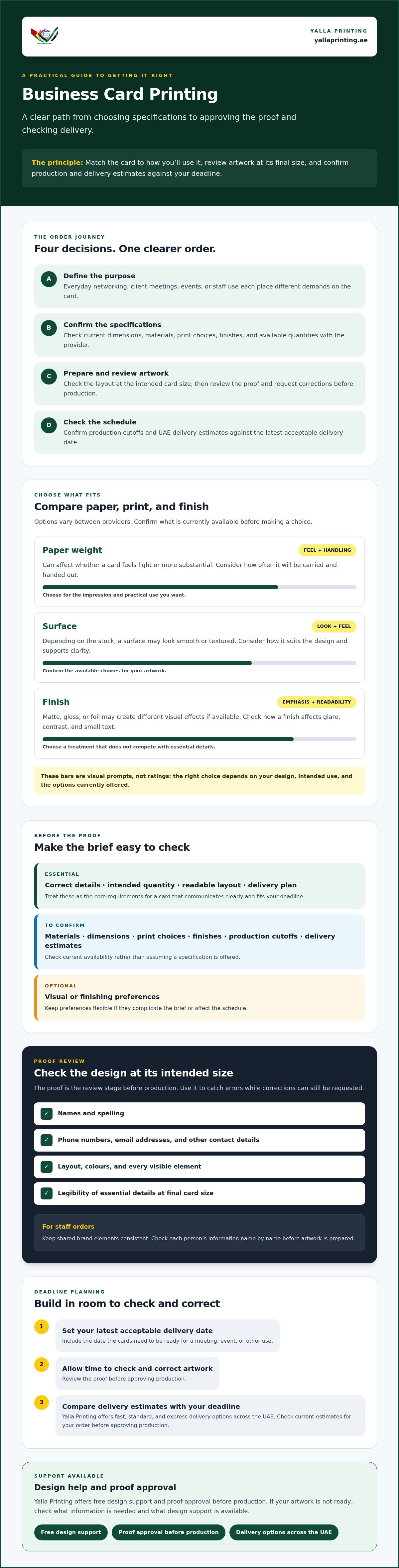
- Match the card to its purpose, whether it’s for everyday networking, client meetings, events, or staff use.
- Compare paper, print, and finish options after confirming what’s currently available for your business card printing order.
- Review contact details, layout, colours, and every visible element in the proof before approving production.
- Allow time to check and correct artwork, then confirm production and UAE delivery estimates against your deadline.
- Yalla Printing offers free design support and proof approval before production to help guide your order.
Business Card Printing: What to Decide Before You Place an Order
A business card shares your identity and contact details in a compact format. It might introduce you at an event, serve as a reminder after a client meeting, or give your staff a consistent way to share their contact information. Business cards commonly combine a person’s name and contact information with business identification. Decide what yours need to communicate before comparing print options.
Your intended use, brand presentation, artwork readiness, and latest acceptable delivery date all shape the order. A print proof is the review stage before production, when you check the submitted design and request corrections before printing begins.
Match the card to the people and setting
Think about who will hand out the cards and where. For everyday networking, prioritise details that are easy to read at a glance. For client introductions, you may give more attention to how the brand is presented. In either case, check the layout at the intended card size, not just enlarged on a screen. Make sure names, phone numbers, email addresses, and other essential details are legible and easy to find.
For a staff order, decide whether everyone will use the same design or whether some roles need different details. Keep shared brand elements consistent, and check each person’s information before artwork is prepared. A simple name-by-name review can help catch spelling or contact-detail errors before they reach the proof.
Set a clear brief before comparing printers
A useful brief helps you compare like with like. Note the quantity, intended use, artwork status, and latest acceptable delivery date. Then list the specifications to confirm with the provider, such as card dimensions, paper or material, print options, finish, and available quantities. Options can vary, so check what is currently offered rather than building your design around an unconfirmed choice.
Separate must-haves from preferences. Correct contact details, a readable layout, and delivery by a particular date may be essential. A special finish may be optional. This helps you identify which details can change if a preferred specification is unavailable or affects the schedule.
- Essential: correct details, intended quantity, readable layout, and a delivery plan that fits your deadline.
- To confirm: available materials, dimensions, print choices, finishes, production cutoffs, and delivery estimates.
- Optional: visual or finishing preferences that can be adjusted if they complicate the brief.
If your artwork isn’t ready, ask what design support is available and what information the provider needs. For business card printing, a complete brief makes it easier to prepare the design, review the proof, and confirm the order with fewer surprises.
How to Choose Business Card Paper, Print, and Finish
Paper and finish affect how a business card looks and feels. Options vary between providers, so confirm Yalla Printing’s current specifications before choosing a stock, print method, or finish. Compare the available choices with your intended use and artwork rather than assuming a particular grade or treatment is offered.
Once you’ve confirmed the available options, use this framework to compare them:
| Option to compare | Appearance | Everyday handling | Best-fit use |
|---|---|---|---|
| Paper weight | Can affect how substantial or flexible a card feels | Consider how often cards will be carried and handed out | Choose based on the impression and practical use you want |
| Surface | May appear smooth or textured, depending on the stock | Consider how the surface feels and how it suits the design | Use a surface that supports your brand style without reducing clarity |
| Finish | Matte, gloss, or foil may create different visual effects, if available | Check how the finish affects glare, contrast, and small text | Choose a treatment that adds emphasis without competing with key details |
Choose paper stock for appearance and use
Stock weight can affect whether a card feels light or more substantial. The surface also changes its appearance and feel. A smoother look may suit a clean layout, while texture can add a tactile detail. These are selection points, not a guarantee that a particular stock is offered. Confirm the available choices and ask how they suit your card dimensions and artwork. When comparing options, consider how the card will be handled and whether the design remains clear on the selected stock.
Compare finishes without losing sight of readability
Matte, gloss, and foil are possibilities to ask about, not confirmed options in Yalla Printing’s current range. Keep the name, phone number, email address, and other essential details easy to read. Strong contrast supports legibility. A decorative treatment can draw attention, but avoid placing it where it makes small text harder to see. Consider the whole design, including how the finish may affect glare or contrast, rather than choosing a treatment based on appearance alone.
Review the proof before production and check that the design is presented as intended. Vistaprint’s artwork and proof approval checklist covers practical file-preparation checks to consider. To compare current options for business card printing, confirm specifications before finalising your design and order.
Business Card Printing: How Artwork and Proof Approval Prevent Avoidable Errors
Accurate artwork is only part of a successful business card order. The final proof gives you a chance to review how the design is presented before production begins. Set aside time to check it carefully, especially if the order includes details for several staff members.
Michigan State University Extension offers practical guidance on what to include and how to keep a card design clear in its discussion of a good business card investment. Apply those basic principles while checking your own artwork and proof.
Prepare and review the business card artwork
Start with the information. Check each name, job title, phone number, email address, and web address against your final copy. Then view the layout at its intended size. Text that looks readable when enlarged on a screen may be too small or crowded on the printed card.
Review visual hierarchy, contrast, alignment, and spacing. Make sure the most important details stand out and that no text or logo sits too close to the edge. Check the printer’s file requirements for dimensions and any other artwork specifications before submitting files. If you’re unsure about a requirement, ask the printer rather than guessing.
If you’re not ready with print artwork, Yalla Printing offers free design support. Confirm what assistance is available for your order, and provide the correct text, logo, and design preferences before work begins.
Use the proof as the final approval checkpoint
Compare the proof with the version you submitted and the details you intended to show. Inspect every visible element, including both sides if the design uses them. Check spelling, contact information, layout, colours, and any corrections requested during review. If something is wrong or unclear, report it and review the updated proof before responding.
- Check details: names, titles, phone numbers, email addresses, and web links.
- Check the design: text size, contrast, spacing, alignment, and placement.
- Check changes: confirm each requested correction appears in the latest proof.
Production should proceed only after you’ve reviewed and approved the proof. Approval confirms that you’re ready for the business card printing order to move into production. Check each version rather than relying on an earlier review or assuming a requested correction has been made.
How to Plan Business Card Printing Around Your Deadline
Start with the date your cards need to be in hand, then work backwards. Business card printing involves more than production and delivery. You’ll also need time to prepare the brief, submit artwork, review the proof, and request corrections if needed. For a meeting or event, confirm the schedule for your specific order before proceeding so you can allow time for each step.
Build a realistic order timeline
Map the order in sequence and leave time for each checkpoint:
- Set the in-hand date. Note when the cards must be ready for use, not just when you plan to place the order.
- Prepare the brief and artwork. Finalise names, contact details, quantity, and design files as early as possible.
- Confirm production and delivery estimates. Ask about current cutoffs and expected timing for your selected specifications and destination.
- Review the proof and corrections. Keep time available to check every detail and request changes before approving production.
If staff names, phone numbers, or artwork are still changing, allow for revisions in your plan. Approving the proof promptly, once it is accurate, helps keep the next steps on schedule.
Yalla Printing states that fast, standard, and express delivery options are available. Confirm which option applies to your order, whether it’s currently eligible, and the estimated timing before relying on it for a fixed deadline. Production cutoffs and options can depend on the order details, so verify them rather than assuming a particular delivery speed.
Confirm UAE delivery and order support
Yalla Printing states that delivery is available throughout the United Arab Emirates. Before checkout, check that your delivery details are correct and that the selected option matches the timing you confirmed. Keep your order information and deadline together so you can refer to them if you need to ask a question.
For order queries, support is available through the website and WhatsApp. Use these channels to clarify current production cutoffs, proof timing, delivery estimates, or any other detail that could affect your schedule. Allow time to receive a response, review the proof, and approve it before production.
Planning an upcoming order? Check business card printing options and delivery details before confirming your deadline.
Order Business Card Printing with Yalla Printing
A clear order follows a few practical steps: define how you’ll use the cards, confirm the specifications, prepare the artwork, review the proof, and verify delivery. Yalla Printing offers free design support if your artwork needs preparation, along with proof approval before production. Use these steps to check the details before your order moves ahead.
What to have ready before starting an order
Gather the information your order depends on. Having it ready makes it easier to confirm suitable options and avoid delays caused by missing details.
- Quantity and use: Decide how many cards you need and whether they’re for staff, meetings, or events.
- Final text and artwork: Check names and contact details, and prepare your logo or other brand artwork if available.
- Preferred options: Note the specifications you want, then confirm which materials, finishes, and quantities are currently available.
- Deadline and delivery details: Share the date you need the cards and confirm the destination for delivery.
Flag a firm deadline early. Yalla Printing states that fast, standard, and express delivery options are available, but confirm current eligibility, production cutoffs, and delivery estimates for your specific order. If the artwork needs preparation or adjustment, ask what design support is available and what information to provide.
Complete the order with a clear approval step
Review the proof before approving production. Check the text, layout, colours, and any changes you requested. If you spot an error, submit the correction and review the updated proof before giving approval. Take the time you need to check every visible detail before confirming that the proof is ready for production.
Before completing the order, verify that the selected delivery option and destination match your plan. For business card printing, a checked proof and confirmed delivery details make the next steps clearer. You can ask order questions through Yalla Printing’s website or WhatsApp.
Explore business card printing and get order support when you’re ready to confirm your options or ask for help.
Get Your Business Cards Ready for the Next Opportunity
A dependable business card order starts with clear priorities. Choose specifications that suit how you’ll use the cards, then check that the artwork is readable and the contact details are correct. Before production, review every part of the proof and request any needed changes. That final check helps you approve the design with confidence.
For business card printing in the UAE, Yalla Printing offers free design support and proof approval before production. Delivery is available throughout the UAE, with fast, standard, and express options stated as available. Confirm current specifications, delivery eligibility, and estimated timing for your order before checkout, especially if you’re working towards a meeting or event date.
Have your preferred options, final text, artwork, and delivery details ready. If you need help, reach out through the website or WhatsApp, then approve the proof only when it reflects what you want printed.
Explore business card printing and get support with your order. With a clear brief and a careful approval step, you can move forward prepared.
Frequently Asked Questions
What should I check before approving a business card proof?
Check every visible detail on the proof before approving it for production. Verify names, job titles, phone numbers, email addresses, and web links against your final copy. Review the layout, text size, colours, spacing, and alignment, including both sides if your design uses them. Compare the proof with your submitted artwork and confirm any requested corrections appear in the latest version. If anything looks wrong, ask for a correction before approval.
Can I get help designing business cards if I do not have print-ready artwork?
Yes. Yalla Printing states that free design support is available if you’re not ready with print artwork. Prepare your final text, logo or brand artwork, and any preferences you have, then ask what support is available for your order. Confirm the scope before starting, as the specific help you need may depend on the artwork and requirements. Review the proof carefully and approve it only when the details are correct.
How do I choose the right paper for business cards?
Choose paper based on the impression you want and how the cards will be used. A heavier stock may feel more substantial, while the surface can affect the card’s appearance and feel. First confirm which stocks and specifications are currently available for your order. Consider whether the card is for frequent handouts or key client introductions, then compare the options and check that your design remains easy to read on the chosen stock.
Which business card finish should I choose?
Choose a finish that suits your brand while keeping important details clear. Matte, gloss, and foil can create different visual effects, but confirm which finishes are currently available before deciding. Consider how contrast, glare, and small text will work with your design. A decorative treatment can draw attention to a logo or detail, but avoid letting it compete with names and contact information. Check the proof to see how the design is presented before approval.
How long does business card printing and delivery take in the UAE?
Timing depends on the order, artwork approval, current production cutoffs, and delivery option, so confirm an estimate for your specific business card printing order. Yalla Printing states that fast, standard, and express delivery options are available, but check eligibility and timing before relying on one. Start with the date you need the cards, allow time to review and correct the proof, and confirm the delivery estimate before placing the order.
Does Yalla Printing deliver business cards across the UAE?
Yes. Yalla Printing states that delivery is available throughout the United Arab Emirates. Before completing your order, enter and check the delivery details, then confirm the selected delivery option and its current estimate. Fast, standard, and express options are stated as available, but check which one applies to your order. If you have a deadline or a question about delivery, contact the team through the website or WhatsApp for order support.
What information should I include on a business card?
Include the details people need to identify you and get in touch. This usually means your name, job title, business name, and useful contact channels, such as a phone number, email address, or website. Choose details that suit how you work, and avoid crowding the card with information you rarely use. If you add a social profile or QR code, check that it leads to the right destination and remains easy to scan.